We explore the interplay between order and complexity in our Second Sunday workshop with Chief Technology Officer Peter Torpey. Peter, a musician and media experience artist, demonstrates how rhythmic and melodic alignment affects the structure and texture of music. With his examples, Peter shows how alignment, quantization, phasing and polyrhythms can shape a composer’s creative process using Hyperscore.
Predictable and synchronized OR complex and competing?
Order is created in music when there are predictable, synchronized patterns (alignment and quantization). Interest can be created with complex and competing patterns (phasing, polyrhythms). All of these concepts explore how a listener’s perception of rhythm and harmony is shaped by:
The established grid of the beat (quantization).
The deliberate breaking of that grid to create tension (polyrhythms).
The subtle shifting of that grid to create new textures and illusions of movement (phasing).
The vertical combination of pitches that can either support or clash with the rhythmic structure (chords/polyphony).
Alignment and Misalignment
In this workshop Peter begins by exploring alignment, the concept of positioning musical events precisely within a beat or measure. Using Hyperscore’s grid system, Peter shows how notes can “snap” to quarter, eighth, or even thirty-second notes. This snapping ensures rhythmic precision, helping students visualize music’s pulse and subdivisions. Any music teacher will appreciate the opportunity to have student’s workspace default to, perhaps, only quarter and eighth notes for rhythmic beginners.
But, as Peter illustrates, misalignment can also be intentional. Offsetting beats or melodies slightly can produce rhythmic tension, syncopation, or even graceful “sloppiness” that gives a piece character. Examples may include echoes, arpeggiation, chords, polyphony, polyrhythm and phasing.
Phasing, Polyphony, Polyrhythms
Phasing allows the composer to create multiple layers that move in and out of sync. Peter creates an example reminiscent of minimalist composers like Steven Reich, where identical melodies played at slightly different durations drift apart and realign over time. This phasing creates evolving rhythmic and harmonic relationships, much like we experience with the lunar cycles.
Similarly, polyphony and polyrhythms allow distinct melodic and rhythmic voices to coexist—each independent yet connected. Music activities with polyphony and polyrhythms increase student’s understanding of texture in music. With practice in both, students may learn, or improve, their musical skills such as hearing one musical line but performing a different line. What a wonderful way to prepare them for participation in performance music where their part might be one voice amongst many, all blending together to make the whole.
Learning the structure behind polyphonic and polyrhythmic music helps children gain a deeper appreciation for all kinds of music. Experiencing how different melodies and rhythms can fit together to create complex, engaging harmonies and rhythmic textures might broaden their listening choices. Accordingly, Peter noted that these complex textures are often found in jazz, rock, and African traditional music.
“Re-Aligned”
Throughout the discussion, Peter emphasized Hyperscore’s unique visual and creative capabilities: how grids, snapping, and harmony tools can help students understand not only when notes align, but why they might not. The workshop closes by celebrating experimentation—encouraging composers to show an understanding of alignment for clarity, and then breaking it intentionally for creative expression. The result is a fascinating look at how technology and musical intuition can harmonize in creative ways while composing music!
Enjoy the entire workshop here:
Peter shares his insights into the importance of alignment in composing music with Hyperscore, as well as the joy of breaking alignment through arpeggiation, echoes, phasing, polyrhythms and polyphony.
Students at the 2023 F2F Foundation Summer Music Camp create music with Hyperscore
Connecting STEM with the Arts is as simple as opening Hyperscore, New Harmony Line’s web-based music composition tool. Anyone of any age or ability can compose in Hyperscore. Due to our generous donors, the Hyperscore classroom is available at no cost and includes our team’s educational services. As an educator, you do not need specialized music training, nor do your students, in order to incorporate music into your teaching of other subjects. Music becomes another medium, just like writing, visual arts, and model-building, for students to explore and express their understanding of a topic.
With Hyperscore, students create their own melodic and rhythmic patterns and assemble them into full musical compositions. It’s easy, intuitive and fun. Students can fine-tune their creative ideas by adding dynamics, form, different instruments and adding harmony such as chords. Finally, adding a title to the piece connects the listener to the composition’s themes.
Read on for specific ideas on how to use Hyperscore in STEAM education!
Connecting STEM with the Arts in Composition Workshops
With Hyperscore, teachers can link composition to various STEM concepts in group workshops. For example, through the Second Sunday Composition Workshop series, the New Harmony Line team has experimented with composing songs in Hyperscore inspired by mathematics, visual art, scientific concepts, technological achievements, and more. The open-ended intuitive structure of Hyperscore allows for students to take a wide variety of such inspirations. With guidance from a workshop facilitator, students’ creativity can bloom.
Replica of the Babbage Difference EngineFairy DoorFraction AttractionMelting Glacier
The following are some examples of compositions made in New Harmony Line’s Second Sundays workshops. “The Melt” was inspired by the sounds of a melting glacier. “A Song for a Forest Fairy” is a theme song for Haleigh Overseth’s fantasy character Daisy Rae whereas “Mr. Hank! and the Bucket” is a musical re-telling of the picture book There’s a Hole in the Bucket. “The Hero In You” contains a theme for each of the inner voices that challenge children to form their best identity, featuring the author of “Harmony Hare and Her Three Voices“, Tammy Vallieres.
“The Countess of Lovelace” is a piece inspired by the Babbage Difference Engine whereas “Algorithms and Music Composition in Hyperscore” takes its inspiration from programming, functions, and modular music composition. “Canon Fodder” is a reimagining of Bach’s “Canon in D” while “Dance of the Fireflies” was sparked by someone sharing a photograph by Daniel Kordan. Using a team member’s fun bebop theme brought about “Lazy Bop“, while “Aire Currents” provided an opportunity to realize new music for a dance video from YouTube. We created “My Grandfather’s Clock” when a workshop attendee was fondly reminiscing about a folk song that he sang as a child. Thankfully this list will continue with our monthly workshop, but we’ll close this section with “Fraction Attraction” an idea that came from a team member’s unit on division of the musical beat and its connection to the study of fractions in math class.
Schools, Museums, Festivals and Camps
New Harmony Line shared Hyperscore in the Boston Museum’s “Created By” Festival, the Cambridge Science Festival and Iowa City Artsfest and Jazz fest. These events allow children, their parents and community members to create music using our technology. As expected, these festivals celebrate STEAM programs that promote ingenuity, creativity and innovation. Click the play button on the sketch window to activate the linked innovation video, created by a 4 year old. What great spaces to share Hyperscore!
Students Pre K through 12th grade have written simple harmonies to incredibly complex pieces with our technology tools. 2nd grader LS completed her assignment to create whole, half, quarter and eighth notes in a percussion window. This achievement earned her independent creativity time. WOW! Step away and look what can happen. She discovered how to set the melody window to 32nd notes on her own. Indeed, her video on our YouTube channel has 120 views, more than any other student piece and rightly so.
In 2022, the F2F (Faith to Form) Foundation hosted a Hyperscore segment in their summer camp founded by composer Vel Lewis. For 2 years we had the opportunity to work with inner city youth in Houston attending his summer camp. In addition, CS4Youth hosted a Hyperscore project in 2024 for the last day of BotBall Robotics Camp held in Massachusetts. Campers created a theme song for the debut of their robot as it moved through its obstacles. What a delightful way to use technology in TWO ways!
Both the United States and international countries have enjoyed access to Hyperscore. Music Teacher Odysseas Sagredos, Greece, loved Hyperscore so much. He taught his elementary and secondary students to use the technology with incredible results. The Projectory in Seoul, South Korea hosted an interactive Hyperscore session in 2023 with students creating their work in teams. Teacher Frederico Ferohna shared Hyperscore with his music students. His classes chose two pieces to share live from Portugal on a Zoom with us to our delight.
The Hyperscore Challenge
The Hyperscore Challenge is an idea that has became hugely successful due to the embedded YouTube video prompts into the Hyperscore workspace. Anyone who participated from March to May could submit their composition(s) for our website. We published our galleries, 2024 and 2025, on International Make Music Day.
As one can imagine, the addition of video prompts added multiple STEAM opportunities:
What does outer space (age 8) sound like? Which instruments (ages 2 and 4) best portray chickens hatching and baby birds being fed by Mama bird? How does one musically describe a little girl mimicking the dance moves of a robot (age 58)? What instruments portray each character (age 3) seen in an under-the-sea vignette?
Incidentally, we discovered that the video prompts were very effective with Pre-K students as they easily chose a composition focus. With an adult utilizing a mouse, young children are able to make story line musical choices by guiding the adult’s hand and clicking the left button.
Where will Hyperscore take STEAM next? Where will STEAM take Hyperscore?
The Kennedy Center for the Performing Arts defines arts integration and STEAM as “an approach to teaching in which students construct and demonstrate understanding through an art form. Students engage in a creative process which connects an art form and another subject and meets evolving objectives in both.” The internet and social media abound with praise for initiatives such as Arts Integration and STEAM.
New Harmony Line has had amazing experiences in the last few years with STEAM through Hyperscore. Currently, a connection with the Institute for Arts Integration and STEAM led to exhibiting at the Creativity Rising Conference in July of 2025. Over 40 music teachers, arts integration specialists, classroom teachers and arts integration administrators registered for the Hyperscore Classroom. We are already planning the trip for next year!
Would you or your team like to attend a series of workshops? Professional development is at your fingertips with our workshop offerings. New Harmony Line is in the planning stages with the Arts Integration and STEAM team at BYU in Utah. We will also be presenting and exhibiting at their Arts Express Conference in 2026.
The Dallas Symphony will be debuting a wall-sized interactive Hyperscore exhibit in the Jeanne R. Johnson Music Innovation Lab in the coming month. In addition, our team is also excited about an opportunity to work with Emily and Bryan at the Lexington Public Library in Kentucky. Emily was at Creativity Rising and has some wonderful plans to use Hyperscore in their STEAM room at the library!
Your turn! Where can Hyperscore take YOUR program?
I have been volunteering as a music teacher at an Iowa City youth detention facility over the past two years. To be honest, I found it challenging to engage the youth. They would have loved nothing more than an hour of streaming their favorite hits. However, the facility does not allow internet access, and the music they were passionate about was not in my wheelhouse.
In comes MC Animosity, rapping to the Spotify instrumental of their favorites. Hitting the flow with his lyrics about taking a different path. Becoming the person you were meant to be. Not being defined by the path they took that landed them in detention. Freestyling with the words they shouted out, melding into the poetry he was unveiling. His presence was magical for our students.
Not your typical music education student
MC Animosity, AKA Derek Thorn, is a music education student at the University of Iowa. Derek has won the hearts and minds of his professors and fellow students at the School of Music. He is well-known in the Iowa City community as a solo performer and as a member of The Uniphonics. In mid May, he was the first music ed student to rap as part of his senior recital. Imagine–Schubert’s lieder followed by a Polo G instrumental backing up his clever rhymes!
Derek hails from Ohio. He frequently mentions the importance of his mom and pops, wife, family and friends in his freestyling. Derek ends every conversation with the most sincere wish for “peace and love”. He projects a positive and loving attitude. It’s easy to see how he brings warmth and wishes for good change into the rhymes he shares with the youth.
MC Animosity and Cece: collaborating with New Harmony Line
I owe my participation at the Youth Center to Dr. Mary Cohen, a Professor of Music Education and Professor in the School of Music at the University of Iowa. She led the Oakdale Prison Choir, “The Inside Singers”, along with community members from 2009 until 2020, when COVID closed the program. Unfortunately, after COVID restrictions ceased, the new warden would not allow the program to begin again.
As a passionate prison abolitionist, Mary found a new way to share the power of music in a local youth detention center. Her U of I students, including Derek, have participated in the weekly sessions with the youth since September of 2023. She invited me to join the group in March of 2024 with the goal of sharing an opportunity to create music using Hyperscore.
Mary begins every session with a check-in, an interactive word game to get everyone talking, and then introduces Derek. His section begins with posting his new lyrics and discussing the positive message within. Then he shares his highly anticipated reveal of a new rap with lyrics. He checks Spotify weekly. Making sure his backing beats come from a new or popular hip hop artist, Derek wins the hearts of these listeners.
When Derek learned that my contribution to the lesson was a breakout session with Hyperscore, we started to collaborate on having the youth make beats. This led to his position in the New Harmony Line team as our beat maker. His awesome prototypes are posted in the Hyperscore Classroom Community, where they are remixable and shareable.
MC Animosity and Cece: “Raps and Beats” at the Mercer Park Rec Center
In February this year, Derek and I received the good news that the Lauren Dunne Astley Memorial Fund would be giving us a mini-grant to teach rapping and beat-making with Hyperscore at a local rec center for youth aged 12-18. The fund’s board was intrigued by our proposal due to Lauren’s interest in the arts and community service. Tragically, Lauren died in 2011 at the hands of her former boyfriend, a victim of breakup violence. Since 2013, the foundation’s mission has been to “promote dynamic educational programs, particularly those in the areas of the development of healthy teen relationships, the arts, and community service.”
In April, we began our journey by teaching four sessions at a local high school. Many of the students are begging for Derek to come back.
This was quite different from our experience at the youth detention center, where the students wanted to make beats like their favorite artists but did not know how to notate the complex patterns. As we had not published Derek’s prototypes yet, most of them chose rap-making over beat-making.
In contrast, at our weekly rec center class, we found students (mainly 6th graders) who will leave the gym and gossip circles to help us remix Derek’s beat prototypes. He presents his rap with their beat mix and has even had a few students rap the chorus. A group of six friends recently stayed for 40 minutes and promised to be back.
I hope our story inspires you to introduce children and youth in your community–at school, recreation center, Boys & Girls Club, YMCA, and other youth centers–to the Hyperscore Challenge. Encourage them to share their compositions on our online gallery for International Make Music Day. Sign up here.
P.S. We hope to apply for another grant to visit middle and high schools for an artist-in-residence style project next year. We hope Derek can continue on our team, teaching youth to compose beats and flow with their awesome, positive lyrics.
The Hyperscore Challenge Gallery, both visually stunning and musically delightful, premiered on International Make Music Day, June 21, 2024. Fifty-two U.S. and international composers submitted an original composition and/or a soundtrack for a video short prompt that we provided. Participants ranged in age from 6 years old to adults. June Kinoshita, New Harmony Line’s Executive Director, is the visionary behind the many ways we share Hyperscore with the world. Our team could never have imagined the response to June’s 2023-2024 challenge! Enjoy their pieces while you consider participating in HYPERSCORE CHALLENGE 2!
Nine examples from the Hyperscore Challenge 2023-2024 Gallery posted on International Make Music Day, June 20, 2024.
Hyperscore Challenge 2023-2024
Our team had a lot of experience in the music room, and at festivals and workshops. It was clear to us that anyone of any age or ability could participate in exercising their musical imagination through the challenge. We posted the link on our website hoping to get a response from social media and word of mouth. 160 sign-ups later, the team was thrilled with the response to our challenge!
Student Hyperscore Challenge clubs–Secondary
We were able to have three school clubs. The first club met the last period of the day for students in a junior high special education program. One student participated independently while four others worked one-on-one with paraeducator support or Cece. In this club we made good use of the modified materials from our curriculum. This handbook worked especially well for our student who was non-verbal and made his choices from 2 variables only.
All five students were able to create a piece and title it. With great appreciation, the club ended the second to last week of school with an ice cream and “concert” slideshow or their pieces. Staff, the students and their peer buddies enjoyed their final compositions. Video copies were emailed home for Parents and Guardians to enjoy.
The second club was at the same school but met after the school day. A preview of Hyperscore was shared with students from the band, orchestra, choir and Music Tech classes. Fourteen composers chose to attend. Some of them were complete beginners. Other students had music in their head but not the notational skills to write it out. It was fascinating to have a student who was Suzuki trained. He wrote out parts for The Peer Gynt Suite then updated the piece using tone color and rhythmic/melodic variations.
The rival of any secondary after-school club is sports practice. Sadly, when track season started, 12 of our composers left us to excel in other ways. Two 8th grade students came every time and wrote multiple original pieces as beginners. One chose to have her piece included in the Hyperscore Challenge Gallery. We celebrated the end of our club with cookies and a “concert” as well. Video copies were sent to their Parents/Guardians and favorite teachers and friends.
L. R-S. Grade 8 Iowa
Student Hyperscore Challenge clubs–Elementary
Being the music teacher, or a long-term substitute, has its advantages when trying to engage youngsters in a club. During the 2021-2022 school year, Cece taught K-5 music in an elementary while their teacher took maternity leave. Every student got the chance to compose with the brand new demo version of Hyperscore 5. So, when the opportunity arose in 2022-2023 to do an after-school composition club, the response was wonderful!
17 students, ages 6 to 11 attended most, or all, of the sessions from September to May. Several of the students worked on the same piece, perfecting its sound. However, others wrote prodigiously with something new every week. All students made progress in the quality of their work.
M.S. Kindergarten Iowa
This club celebrated the end of the school year with a concert in the school library with Parents/Guardians, teachers and staff from the school, siblings and friends. Each piece was played to great applause. Because students had freedom to choose how to compose, we had a 5th grader choose to compose a piece that she wanted to play on the piano. Since Hyperscore can be readily transcribed into standard notation, Cece has been working with her to learn this duet. This club will meet again starting in March 2025 for Hyperscore Challenge 2!
How to participate in Hyperscore Challenge 2
Every group, team leader, teacher or individual who signs up for the Challenge will receive the Hyperscore Classroom at no cost through International Make Music Day, June 21, 2025. The Hyperscore Classroom will allow you to manage, and create accounts, for all of your students in the classroom, all your clients or employees at your place of work and the community and/or your friends and family. The Hyperscore Classroom includes ALL the bells and whistles (plus a taiko drum too!), unlimited scores and unlimited rhythm, melody and sketch windows. Participants under 13 are allowed to create an account with a Parent/Guardian consent form.
The website page for Hyperscore Challenge 2 went live on March 3, 2025. This page will include flyers for recruiting participants, video prompts and links to activities. If you want your imagination to soar, use the video prompts to “compose a soundtrack”–new video prompts are available each week. Also, the team does a monthly FUN Second Sunday Composition Workshop that everyone is invited to attend at 9 am ET. Sign up here.
We hope we have you convinced–let’s go Hyperscore Challenge 2!!
Thank you to all of our composers who shared their Hyperscore joys with Great NonProfits!
Composing music from art was the challenge we received from our wonderful collaborator Polina Lulu. We met Polina in our group composition workshop at the 2023 Connected Learning Summit. She enchanted us, and the other participants, with her delightful compositional ideas about a polite Canadian squirrel. Not surprisingly, Polina is a Child Experience Researcher who studies learning, technology and play.
Polina loved Hyperscore so much that she agreed to be a guest on our Reimagining Music podcast in February of 2024. In the fall of 2024, she introduced her 2 young children to Hyperscore. She took note of what they were able to do instinctively with the program. In a meeting afterwards, she was able to share some really interesting ideas about how a young child might use Hyperscore.
Why not start with the art? Open the sketch window, using the colors to draw lines, squiggles and dots. Next, use the dynamics tool to make the shapes bigger or smaller. Finally, write the musical story behind the art using the melody and rhythm windows.
Start with the art
The New Harmony Line team accepted Polina’s challenge of composing music from art at our December 2024 Second Sunday Composition Workshop. The team began to use multiple colors, line shapes and dots to create a piece of art in the sketch window. Asking for lines to be copied then moved higher and lower produced interesting results. In addition, a group of squiggles and dots became a visual ‘section’. Copying and pasting these elements created an introduction, chorus and coda of color.
Polina challenged us to draw the sketch window first THEN create the melodies and rhythms to match the colors.
Composing music from art
Once everyone was satisfied with the artistry, there were musical decisions to be made. Should the blue and purple introduction be percussion or melody? Composing a cool kick pattern gave us our answer–percussion it is! Sneaking in a melody was easy when played below, then repeated above middle C.
The fiery red, yellow and orange section became our showpiece, especially with the repeat. Starting with a melody for orange, we quickly realized that a drum (red) and bass line (yellow) would make this section complete. Having art with lines that go up and lines that go down made the composing intimidating. What if they don’t sound good together?
Well, they didn’t. Fact. Keeping our challenge in mind, we decided not to change the art to fit the music. On the repeat of the chorus we doubled the orange and placed it below the original art. In contrast to our first chorus, we all agreed that doubling the melody. then differing the dynamic levels was a significant improvement! Due to these positive results, we changed the dynamics in every section.
Final review
With a one hour workshop spilling over into an additional half hour, we had to bring our work to a close. For the most part, the team agreed that drawing first then composing was really fun. It stretched our brains in imaginative ways. If we’d had time to work with the Harmony buttons we may have made a more consonant piece. However, it’s “a great stART” and a topic we can come back to any time in our fun Second Sunday Composition Workshops this year!
Comparing the workspace in Chrome Lab Song Maker and New Harmony Line's Hyperscore
by Cecilia Roudabush, New Harmony Line Director of Education; General and Adaptive Music Teacher–32 years
This post is a more detailed comparison of two composition tools available on the internet.
Chrome Music Lab: “Chrome Music Lab is a website that makes learning music more accessible through fun, hands-on experiments.”
Hyperscore: “Lay down some notes, listen, react and evolve. Hyperscore puts creativity first and encourages active listening and purposeful composing.”
At first glance, anyone teaching music composition, or composing themselves, may look at Chrome Music Lab’s Song Maker and Hyperscore and think they are interchangeable. Both applications use colorful, user-friendly graphics and straightforward, intuitive interfaces. However, time spent using both programs reveals significant differences in their ability to add complexity to the piece, both intuitively and creatively. In this review, I celebrate the wonderful uses of Song Maker while showcasing the advanced capabilities of Hyperscore.
What features make both applications shine?
Each application features comprehensive tools that make it easy to have a full musical experience without instruction. Both use a grid to indicate low to high pitches and provide tools to write and combine rhythm and melody. Users can also create chords, polyphony, and harmony in both programs.
Tempo and tone color features add another layer to student work. Song Maker and Hyperscore both have undo buttons, while Hyperscore also includes “redo”. Saving is one click on Song Maker while Hyperscore saves continuously to the cloud. Users can download or share their compositions in both programs as MIDI, .wav or .mp3 files. Song Maker is designed as a rainbow-colored workspace, while Hyperscore offers an option to choose rainbow colors in the melody window.
Song Maker and Hyperscore offer a free version for use by anyone of any age or ability level. There are no third party sellers sending you solicitations after you create an account. With all these similarities, why does Hyperscore stand out as the tool that will give users the richest composing experience? I spent many hours comparing the two applications and their tools. I summarized the key comparisons in this table. This article shares what I observed about using the applications for specific learning objectives and teaching tips.
How can one best teach the concepts of note values and length, attack and decay?
Hyperscore’s rhythm window in 4/4
Chrome Music Lab’s Song Maker rhythm grid in 4/4
With Hyperscore, note values are visually displayed on the rhythm and melody grids. Values ranging from 32nd notes up to tied whole notes are available using the bar handle on either side of the note to shorten or lengthen its value. Users can choose to cross the bar line for a tied note value across measures. Learners with fine-motor challenges may benefit from using a mouse or assistive device in order to drag the bar handle to lengthen or shorten a note value.
When listening to a sustained note in Hyperscore, the listener hears the full note value. Learners could be taught that the attack and decay of a particular instrument lends itself better to certain note values. For example, a short, staccato woodblock is best matched with a sixteenth or eighth note value while a tuba or electric bass could play a whole note or tied pattern across barlines. Under settings, the user can choose a rectangular note shape that might provide some learners with a clearer picture of note length.
Song Maker defaults to an eighth-note grid set to 4/4 time. Settings are available to change the subdivision of the grid to quarter notes, eighth note triplets or sixteenth notes. All placed notes are the same length (the length of the subdivision of the grid), and there are no options that allow for variable note length in the same grid. By viewing online Song Maker videos, I learned that it is possible to string notes together in the sixteenth note grid setting to make more sophisticated rhythmic patterns. It would likely take teacher or group leader instruction to use the grid and settings tools. These skills are not immediately intuitive for more sophisticated use. However, the one-click note structure will benefit a wide range of learning styles, and accommodate learners with fine-motor challenges.
How do Song Maker and Hyperscore support rhythmic creativity?
Song Maker offers a simple visual layout of two lines of rhythm. Choosing the top line of the rhythm section gives the user the higher pitched tone color, or instruments, while the bottom line provides the lower pitch sound. There are four tone color (instrument) choices. Composers can alternate two conga, woodblock, electronic or drum kit sounds, or play them simultaneously. Remember that it is possible to increase the sophistication when using the sixteenth note setting.
The rhythm grid, or rhythm window, of Hyperscore initially defaults to quarter notes when users insert a note. As stated before, the value can be lengthened or shortened using the bar handle on the note. The rhythm window is, in my opinion, the best place to let learners start exploring composing. When working in the rhythm window, users don’t have to take pitch into account so it makes rhythm a more concrete concept to start their work. Even younger learners have likely heard, clapped and understood steady beat, making composing rhythm patterns very intuitive.
Hyperscore’s rhythm window includes a grid in 4/4 time. Learners can choose from 6-8 percussion and rhythm instruments that all play at the same time or alternate patterns of sound and silence. With 14 sets of style-specific instruments, students can experiment with multiple instrument combinations. This feature increases their ability to create a more rich rhythmic landscape. Composer’s notes and patterns can be copied and pasted, with or without variation, in successive measures.
The Create, Listen, React Composition Cycle championed by Hyperscore, guides the learner to lay down rhythmic notes and patterns, listen often and determine if they like what they hear, and what they want to change. With so many note values available to them, the variety of rhythmic windows composers produce is astounding no matter their age or ability. I have found that students who are struggling to get started just need a kick, snare, kick, snare steady beat pattern to get the creative juices flowing on all of the other instrument lines.
What are the advantages Hyperscore provides when composing a melody?
2-measure C3 to B4 grid; adjust octaves in settings2-measure C3 to C5 grid; additional octaves in the sketch window
The melody features of Song Maker and Hyperscore are visually similar with a piano-roll-like layout. Users can see a visual representation of pitch by how high and low the notes are on the vertical axis. Composers are able to listen to their work as they place notes. However, in Hyperscore the listener can drag individual notes higher and lower. This key feature allows them to hear and compare the sound of a note to the ones before and after.
In addition, the user can move the play button to the section of the melody they are working on. This is such a valuable feature in order to listen to a specific moment in the piece. With Song Maker, the pitch sounds only when the note is placed. To hear the pitch again, you must place it back into the grid higher, lower or at the same place. The play button loops from beginning to end continuously until you click stop. It is not possible to listen to only one note or section at a time.
Notes in Song Maker are rainbow-colored. With Hyperscore, the user can choose a setting which will make the diatonic lines rainbow-colored. This design may help new composers to visually distinguish pitch level. Teachers or clinicians could narrow down the notes the learner chooses from. This method may help younger composers and support a more diverse range of learning levels and styles.
Both applications offer a choice of different melodic instruments. Song Maker offers 5 tone colors. Meanwhile, Hyperscore has 14 stylized melodic instrument sets with 7-10 instruments in each set. Hyperscore has the more diverse instrumentation for the user.
Song Maker defaults to 4 measures which are represented with alternating white and light gray backgrounds. The total number of measures available in Song Maker is 16. Hyperscore’s melody window defaults to 1 measure which can be increased by pulling on the right sidebar. The default length of a sketch window is 8 measures. The workspace will allow up to 9 measures of melody in a single melody window. Using a sketch window will allow for a maximum of 40 measures.
Both applications have a dark middle line that represents C4, or middle C. The Hyperscore melodic grid includes an additional time signature, darkened bar lines and lighter demarcation lines within the measure. These lines indicate 4 columns and their subdivisions into sixteenth notes that are lighter still. The melody grid includes additional horizontal colored lines to indicate the major chord tones above and below C4. The lighter horizontal lines indicate the other diatonic notes from C3 to C5. The lightest lines representing chromatic steps in-between.
Reducing barriers to composing a melody using Hyperscore
It is this author’s opinion that the Hyperscore melody window most resembles music notation on the staff. However, that does not require the ability to read note names or connect the pitch to placement on an instrument. This provides the opportunity to reduce barriers for users who have not had note-reading training or vocal/instrumental instruction. As stated in the section on creating rhythm, melody windows have the ability to change note values and cross the barline. Yet another excellent visual aid within Hyperscore’s melody window.
The ability to see and hear pitch level AND length is a strong advantage for users. In the past, I required my students to correctly notate a familiar song of their choice before making an original. This method showed me that they understood the high, middle and low areas of the grid. By having them start on the center line, it was easier to find the correct intervals for their familiar song all in the key of C. Choosing a familiar song made it more likely that they would be able to manipulate the note value correctly. Hearing that they had correctly notated a familiar song was their invitation to start composing something original.
Putting it all together with harmony and polyphony
The third button from the top on the left side of the Melody Window toggles polyphony on and off
The default mode is monophony – enable polyphony to stack notes
When a new composer creates a rhythm and melody, it seems only natural to want to put them together. Perhaps they will be satisfied that their work is complete by simply alternating one or two melodies with a rhythmic accompaniment. In each of the two applications, users can also combine their rhythmic and melodic themes to play simultaneously.
In Chrome Music Lab’s Song Maker, users can align notes to play simultaneously directly in the grid workspace. In Hyperscore, similarly, users can use the polyphony setting in melody windows to allow multiple notes to stack in a single melody window. Where Hyperscore shines in this area, though, is in the sketch window. Users can arrange lines together representing each of their individual melody and rhythm windows. Hyperscore was designed with this compositional philosophy. In all pieces, individual motives serve as building blocks that combine to form a larger composition. This allows for the high potential of depth and complexity in song structure and harmony.
Song Maker’s more bare-bones grid layout is elegant and allows for a certain degree of compositional form. However, it lacks structural editing tools. With the constraint of 16 measures, Song Maker is the less optimal tool for composing harmony or arranging full songs. This may not be a concern for new composers. But, it may have an impact on users whose creative imaginations are sparked by their initial experiments. The deeper creative dive comes with a Hyperscore experience.
Song Maker completed piece
Song Maker’s grid allows the user to stack notes to create chords or harmonies and add a bass line. The piece is finished with a beat in the rhythm grid. The entire grid appears visually as the lowest subdivided note value. Because one cannot change the length of the note value, it creates a pizzicato effect no matter what instrument is used. Unfortunately, it’s not possible to copy and paste patterns into other parts of the piece to create form. Visual 3 shows the completed piece with chords, melody, bass line and rhythm. The user can change the tempo in the range of 40 bpm to 120 bpm. The piece will automatically loop until you hit the stop button.
1. Chords in Measure 1 and melody with harmony in Measure 22. Chords, a harmonized melody and bass line
3. Chords, harmonized melody, bass line and rhythm
Combining motives in the sketch window
When we utilize melody, harmony, and rhythm together in Hyperscore, the opportunities for teaching concepts are dramatically expanded. Chords and harmony can be created directly in the melody window using the polyphony setting. Also, chords and harmony can be made in the sketch window using lines and dots placed at the desired intervals. Composing a bass line in the melody window allows that layer to be added to the sketch window. Thus, the sketch window allows the composer to combine the melody and rhythm window(s). Each rhythm and melody is represented visually by the different colors of their respective windows.
In the following visual, the melody windows are dark green, red, purple and light green. The bass line is yellow, while the rhythm windows are orange and light blue. The thin and expanded lines in the sketch window at the bottom of the screen indicate dynamic levels. Harmony is created in the interplay and spatial relationship between these lines. The texture of the piece is polyphonic. In the center of the piece, there are as many as five windows playing simultaneously. Hyperscore has a looping feature which is activated by pressing the L key. Press the spacebar to stop the loop.
The Hyperscore sketch window is at the bottom of the workspace
The user can also place dots into the sketch window. Each dot will essentially play the first pitch of the melody or rhythm window it represents. The dots are a tool for short chord sounds or repeated short pitches. Some users place dots that aren’t associated with a melody or rhythm as a visual addition to the drawing in the sketch window.
Sketch windows expanded tools
All markings in the sketch window can be transposed higher or lower than written by highlighting and dragging using the arrow tool. One can use the arrow tool to click on a line, dot or to highlight an entire section. This action brings up a new toolbar for the composer to use:
Use the arrow key to click on a line, dot or section of the sketch window and this toolbar will appear
1) the first button to choose a different color making that line transfer to the window associated with the new color;
2) the second button to choose a new tone color but keep the same melodic pitches;
3) the third button to make an exact copy of a line or dot which can be reused in another location–highlighting an entire section allows the user to make an exact section copy which can be moved to the right and placed higher, lower or in the same range (an excellent way to create form);
4) the fourth button deletes the line, dot, section or the copy;
5) the fifth button cancels the harmony line function for that particular line, dot or section;
6) the sixth button is the dynamics slide tool–left for softest to right for loudest.
Harmony buttons
The sketch window also has a feature labeled “Harmony” on the left tool bar. The harmony defaults to “None”, which means that whatever the user composes sounds exactly as written. When the “General” button is clicked, the rules of music theory encoded into the sketch window will adjust the notes to fit into the C Major scale. If the “Classical” button is used, the notes will all be in the same key. I always referred to this as “the Mozart effect”. Most students choose to use None or General so that the piece sounded closer to what they had actually written.
The sketch window harmony line–a game changer, all on its own!
Harmony Line modulations occur by pulling the line in a spike upward or downward
Dr. Kevin Jennings received his doctorate at MIT with his work on creating the harmony line during his studies. Using the General or Classical mode you can bend and shape the harmony line using the arrow tool. The effect is to create areas of tension (green) and release (blue). Pulling the harmony line upward or downward with a sharp spike will modulate the piece into another key. To turn off modal changes, touch a line, dot or highlight a section. Press button number 5 as shown in the previous section. The line can be straightened again by holding the shift key and dragging the arrow from left to right.
So, what’s the bottom line?
I have a whole new appreciation for Hyperscore after writing this comparison. Most importantly, that one can drag the play bar forward and backward to listen to individual sections of the piece. In Song Maker you have to listen from beginning to end to hear the section you’re working on. I also love that composers can hear the pitches as they place and drag them. What a wonderful way to hear the destination that sounds best for that note.
Not being able to copy and paste in order to create form is unimaginable to me. All of my students over 15 years with Hyperscore learned to create form. Most chose ABA form. As another option, they learned how to make an A1 or B1 and add an introduction, bridge(s) and a coda. If there is ever a future update to Song Maker, adding measures to their grid will support teaching the concept of form.
Personalized workspace themes
My favorite newer feature of Hyperscore is the 19 personalized workspace themes that students LOVE! Our CTO, Peter Torpey, is an artist and a tech genius. Peter created workspaces for composers so that their piece matches their mood, sense of adventure or fun on the screen. Included in the workspace choices is a High Contrast theme (3rd example) designed to assist persons with visual challenges. After my students have composed a rhythm and melody window, their rewarded was choosing their theme using the settings button. Black light is a huge fan favorite!
Titling your piece is the last step in a Hyperscore composition. It gives the listener a vision of what the composer was thinking as they shaped their piece. “The Snake” is a good descriptor, but “Snake-y Dance” is even more visionary. Yet another creative opportunity within Hyperscore!
Comparing the two programs with a single composition
Rhythm, Melody, Tone Color, Harmony, Polyphony, Dynamics, Form and the Harmony Line with Hyperscore
Features
Chrome Music Lab Song Maker
Hyperscore
Age
All ages
All ages
Account
No account
Free and paid account tiers
Note Values
Quarter, eighth, sixteenth, eighth note triplets (no mixing and matching)
All note values from 32nd notes to tied whole notes
Percussion
Bass & Kick drum
14 instrument sets with 6-8 percussion instruments per set
Time SignatureEditing
None
Available including odd meter options – user can freely edit both number of beats per measure and value of the beat
Staff/piano roll
Two octaves from C3 to B4; can extend by one octave up to B5
Two octaves from C3 to C5; can transpose by up to 2 octaves higher or lower using Sketch window
Instrument Options
4 percussion instruments & 5 melodic instruments
14 instrument sets with 6-8 percussion instruments and 7-10 melodic instruments per set
Polyphony
Yes
Yes
Harmony
Yes
Yes, including algorithmically assisted harmony modes and modulation options
Tempo
40 to 120 bpm
60 to 168 bpm
Dynamiccontrol
No
Dynamics can be set for individual melody and percussion lines in the Sketch window
Length of piece
Maximum 16 measures
Maximum 40 measures per sketch window; 14 sketch windows possible
Undo/redo
Undo
Undo and Redo
Copy/paste
No
Yes
Looping
Yes
Yes
Remixing/sharing
No
Yes
Audio input
Yes
Expected in future update
Workspacevisual palette
White grid with darker and lighter grid markings
19 visual theme settings for personalizing individual workspace
Saving
Yes
Yes
Downloading
MIDI, .wav; embed code link provided
MIDI, .wav, .mp3, .hsc (Hyperscore file)
Accessibility options
Rainbow colors for pitches; chromatics are lighter or darker colors
Choice of diatonic scale in rainbow colors with chromatics available; high contrast workspace theme
In-app community
No
Yes, with educational version, members can share within their group
The New Harmony Line team was discussing our Office Hours events this past week. We came to the conclusion that what we are sharing with the world through Office Hours is actually a PODCAST that highlights the fabulous people we are meeting as we grow and engage with the world. As a result, please see our wonderful new podcast logo and description above. We are thankful that we’ve met and worked with so many insightful people who reimagine music as we do!
Lisa Pierce-Goldstein attended our first teacher training in the fall of 2021. As a speech pathologist and musician, she created yearly operas with her students with autism. She saw great potential in the graphic interface of Hyperscore for composing with students with special needs. Additionally, Lisa was a great contributor to our early Second Saturday composition workshops. Also in 2021, University of Iowa Music Therapy undergrad Peter Esarey designed and completed the data analysis of our first informal study with 3rd graders using Hyperscore. This was also our first opportunity to use Hyperscore with students with varied learning styles. We had such positive results on student’s rating of their happiness level before and after using the program. It will be exciting to see where Patrick’s graduate work leads him going forward. Maybe another study in his future?!
Jonathan and Vel
The 2022 Texas Music Educators Association Conference brought us two excellent connections. The first was father of 5, and the world’s happiest music teacher and church deacon, Jonathan Ochoa. We also met singer, producer, composer, arranger and world-renowned Hammond Organ specialist, Vel Lewis. Their work with underserved children is inspirational! Vel invited us to do Zoom workshops with Vel’s summer music camp in 2022 and 2023. We’re planning F2F Summer Music Camp 2024! Vel will be our podcast guest in May 2024. Both Jonathan and Vel believe, and live the idea, that every child should experience the joy of music in their lives!
Odysseas and Frederico
We found our first international connections, Odysseas Sagredos and Frederico Ferronha in 2022. Odysseas ran across Hyperscore on the internet and used it to teach his elementary students to lay a bass line, add chords, percussion and melody to create remixes and original pieces. He continues to be so excited that he has met with the Ministry of Education about making Hyperscore part of the Greek curriculum! Frederico also found us on the internet and decided to hold a composition contest, with his students choosing the winners. We were able to send gift cards for the awards ceremony and Zoom in to meet the winners, their friends, Frederico and his colleagues. Truly an example of the universal language of music!
David and Sam
In winter of 2022 we met David Casali and Sam Reti at the National Association for Music Education conference. As part of his PhD in music education at Amherst, he had been working on having students write music for Scratch video games. David’s insights inspired us to come up with our Hyperscore Challenge. He has shared his interest in Hyperscore at presentations on his work. He wrote an article for EdSurge about helping students to find their creativity through composition tools like Hyperscore. Sam has a website he created to provide music lessons for students during COVID. His site has continued to be a successful way for students to access music learning from anywhere. We hope to have Hyperscore be the composition component of their learning!
Casey
This past year, we met Casey Byrd who was starting his 24th year as a music teacher for students who have physical disabilities and communication challenges. He had been teaching with Hyperscore for 23 YEARS! He shared so many ideas on how to break down all barriers that keep students from creating music. In collaboration with the art teacher, classroom teacher and specialists, Casey’s team has created a highly innovative way to write music with Hyperscore. This music is the culmination to a colorful mural they created in art class. Every teacher who works with students who face challenges fully expressing themselves in the music room would benefit from the ideas in his Office Hours recording!
Ben
We met Ben Mirin in 2023 when someone asked us if we had an instrument set featuring bird calls. We were referred to Ben after we found the Bird Song Hero game from the Cornell Lab of Ornithology. Ben is known as the “Wildlife DJ”. He travels the world recording animal sounds and sampling their voices to create music that inspires conservation. We talked with Ben about how he incorporates recordings of animal voices into music to connect young people to their natural world, endangered species, and habitat conservation. He recently had the opportunity to speak about his work at the United Nations. We hope to someday incorporate birdsong and other animal sounds into Hyperscore compositions!
Maude and Kevin
Teachers Maude Hickey and Kevin Coyne were wonderful to talk to because of their experience in the music classroom. Kevin was a Hyperscore pioneer who used the software in the mid-2000’s with his middle school students in Waltham, Massachusetts. Learn how he turned their work into pieces that were performed at the school’s year-end concert. Maude Hickey PhD, is the author of “Music Outside the Lines: Ideas for Composing in K-12 Music Classrooms.” She recently retired from Northwestern University, in Evanston, IL, where she worked in the area of music education. Her research (and passion) focuses on creative thinking for children. She has developed curricula and worked with teachers and students of all grade levels to advocate for more composition and improvisation in schools. Listen to her enthusiastic video, such a great motivation to try out her wonderful ideas!
Polina, Terrence, James, Vel, Bobby…YOU?
We have a wonderful schedule of musical guests to come whom we’ve met in our adventures this past year. Stay tuned for blog posts and office hour recordings, or should I say PODCAST recordings, to come!
My Grandfather’s Clock was written at our Second Saturday Composition Workshop in May, 2023 using the “Create, Listen, React” cycle of composing with the Hyperscore graphic interface. One participant from Boston suggested much of the melodic, rhythmic and harmonic material. When he heard the result, he reminisced fondly about a folk song of the same name. The lyrics created a feeling of nostalgia for the passage of time for a loved one. We were thrilled with the final result. We hope you enjoy this introduction to Hyperscore!
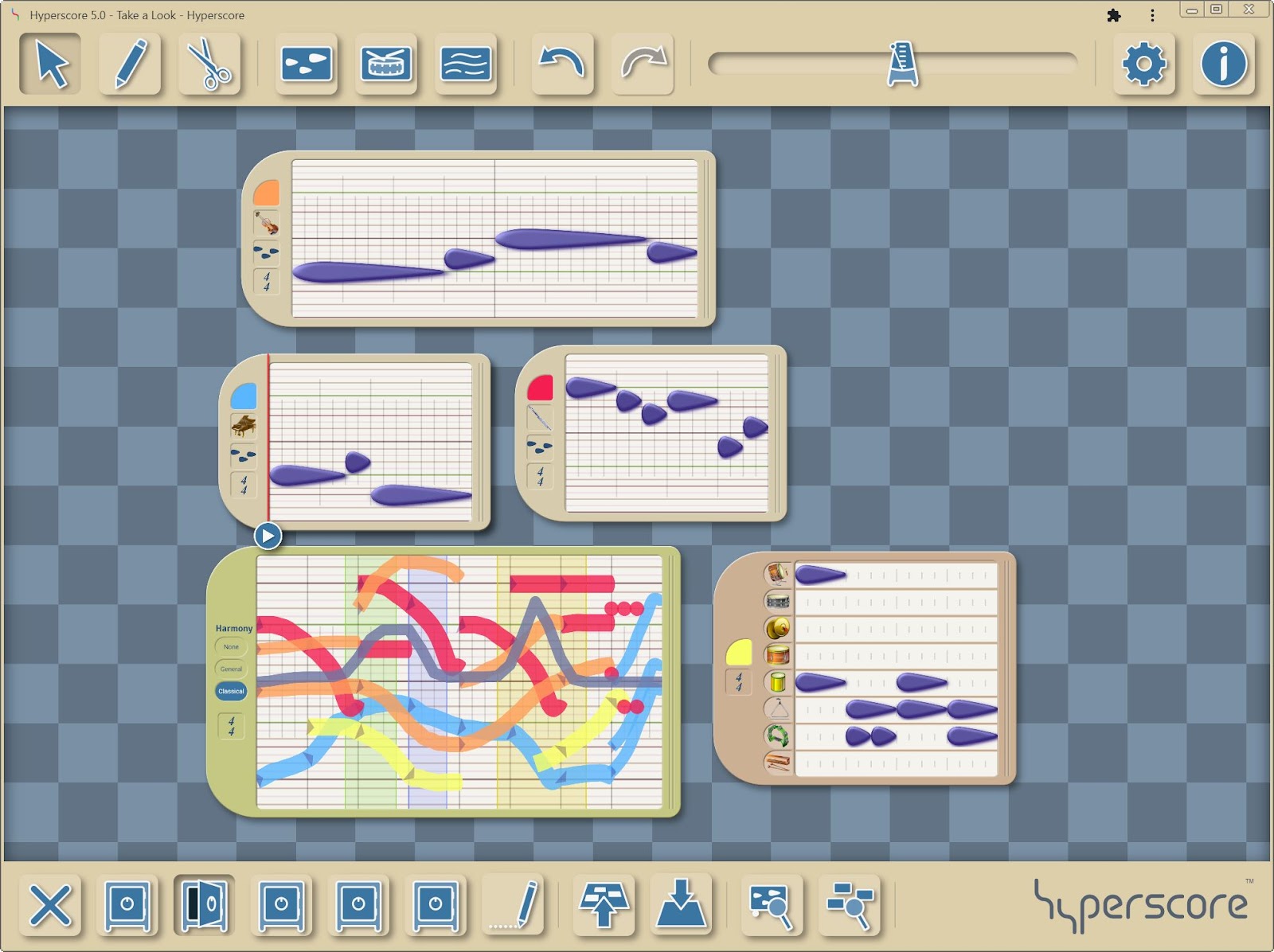
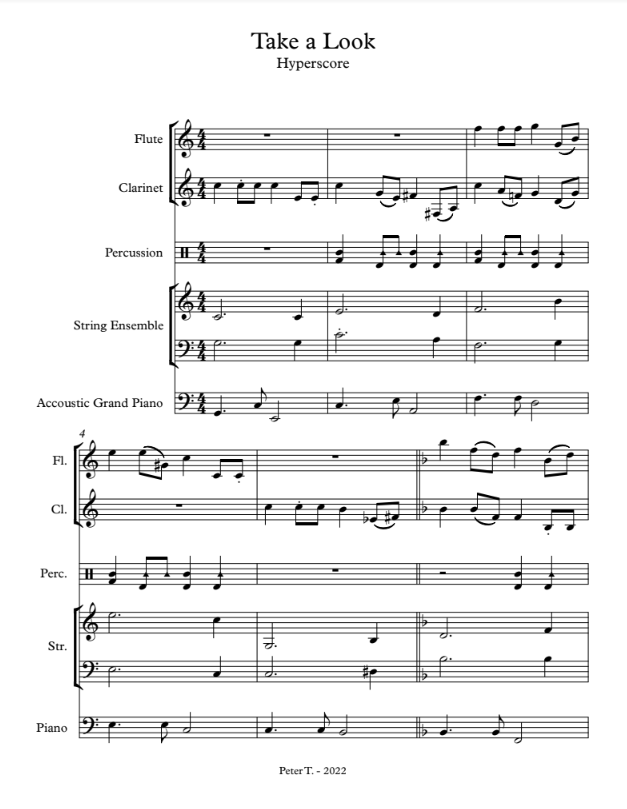
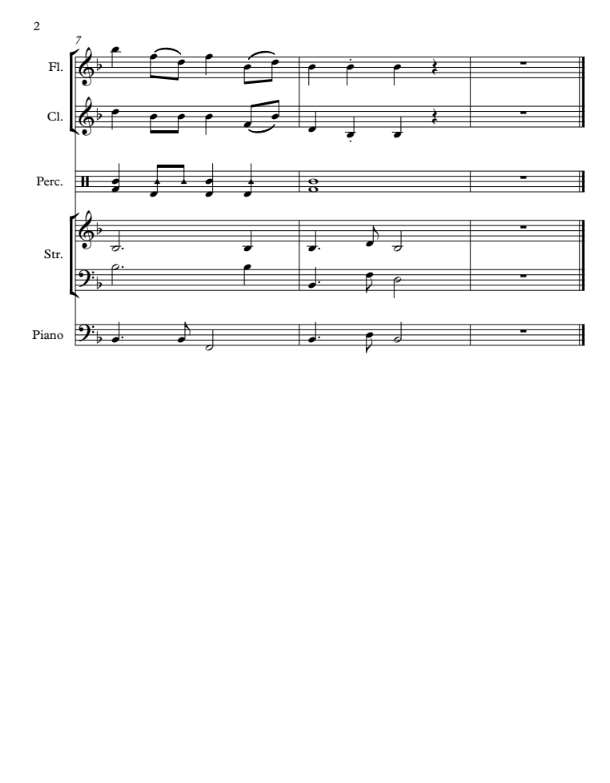
Hyperscore exports to programs like Garage Band or Finale in order to print the piece in standard notation. The goal is to play what was created. Scroll to the bottom of this document to see an example of Hyperscore followed by the piece printed in standard notation.
The Development of Hyperscore:
Hyperscore was created in the MIT Media: Opera of the Future Lab by doctoral students Mary Farbood and Egon Pasztor under the guidance of professor and composer Tod Machover. Drs. Farbood and Pasztor were combining research on computer-assisted composition of counterpoint and visual interfaces with the goal of allowing young children to compose music. Hyperscore was developed into a composition software in 2012, then updated for the web by Dr. Peter Torpey, who also received his doctorate at MIT Media Lab after using Hyperscore as a graduate student. The web-based application was released in 2022 through New Harmony Line with Dr. Torpey as the Chief Technology Officer and Executive Director June Kinoshita as our visionary and voice, sharing Hyperscore with the world. Our organization’s mission is to allow anyone of any age or ability, with access to the internet and a device, to tell their story through composing music.
As part of Hyperscore’s development, Dr. Kevin Jennings, an MIT doctoral student at the time, created the blue line that runs across the center of the sketch window. The Harmony Line, as he called it, creates areas of tension (green), release (blue) and drama (yellow) using principles of music theory embedded in the programming. During a 2022 Zoom meeting showing Dr. Jennings the updated web-based version, he shared a philosophical methodology with us that we have completely embraced called Inverted Pedagogy.
Hyperscore methodologies:
1. TRADITIONAL
Teach an Elements of Music concept then show the students the Google Slideshows provided for Hyperscore tool training and then have them work individually, as partners or in small groups of no more than 3, if possible. Their task is to demonstrate understanding of the concept by creating music with that tool [Teaching the Elements of Music]. Modified materials are provided in all tasks for students with varied learning styles. For example, choosing between high and low with eye gaze or yes/no strategies is effective, if the student has enough time provided to make choices.
Each time you present a new concept, all students return to the same composition and add the new component until they have a completed piece. This method is an excellent way to check off their demonstration of understanding the elements of music. A good place to introduce the workspace themes, a unique feature of Hyperscore, is after they have created one rhythm and one melody which “unlocks” the wonderful reward of choosing a theme and note shape!
Fulfilling the National Core Arts Standards
The goal for the composing unit, other than to fulfill many of the National Core Arts Standards, would be to have a portfolio of work that shows progress from Kindergarten to the last year of general music. Naming the piece is important for ownership–if they’ve begun with a prompt the name might be suggested by that prompt or the action demonstrated. However, there is nothing wrong with “Untitled” or their nickname as the title.
Hyperscore can be taught as a short yearly unit in elementary and a unit or elective class offering in secondary schools. Student pieces may be shared in concert form, as a carousel activity in the classroom and/or shared through the online classroom to parents and families and then placed in their Hyperscore portfolio. The student can choose to have their piece shared in the Hyperscore Community. The greatest achievement for the student composer would be to have their piece played by actual instruments (see printed notation at the bottom of this page)! This author has taught Hyperscore Pre-K-12th grade with students of all ability levels, enjoying great success for more than 18 years.
2. INVERTED PEDAGOGY
Dr. Jennings challenged us in 2022 to think differently about how we ask students to create–to flip the methodology from “sage on the stage, to guide on the side” (Allison King, 1993). Inverting the pedagogy means allowing student composers to create purposefully first, then discussing/expanding on the musical rudiments present in their creative work afterwards. The emphasis on knowing theory in order to compose is reversed–create then learn about what you composed so that the concepts have greater meaning.
Inverted Pedagogy gives access to music making for anyone who might otherwise find barriers to composing due to lack of experience or knowledge. In this methodology, one would teach the tools of Hyperscore by creating a group composition based on a prompt such as a story, artwork, or character/actions. Through this group composition, students would be exposed to the available tools and learn valuable tips such as having each of the motifs be a different color or how to delete.
After group composing, students have individual/partner work time with a prompt to kickstart their process. You become the facilitator and have the ability to check in with everyone over time. Imagine your students spread across the room composing, some on their bellies, then begging you for more time as the period ends with them showing you that their piece is saved as their exit ticket! Headphones are valuable for behavior management. However, most students will be completely absorbed in creating and will not be distracted by others. If headphones are not available, invite students to bring in their own earbuds if they have and want them.
Fulfilling the National Core Arts Standards
After the unit, present pieces as suggested in the traditional method above. The author has had the greatest success sharing class compositions by having students set up their computers on the outside of the room and rotating around, listening to each piece (carousel). Make sure there is a prior discussion about what kind of comments would support their personal creations and the works of their peers.
The Hyperscore Community is another option as well. If students move their pieces into a personal profile, they can continue to work on their pieces and compose more or remix the work of others that have given permission to do so. The end goal, again, would be to have a portfolio showing the student’s growth over their school years in understanding how to manipulate the concepts of music in order to tell their story AND to become someone who sees themselves as musical!
Take a Look, by Peter Torpey, first in Hyperscore notation and then in standard notation:
Musical diversity is a part of your daily life, even when you’re not expecting it. Today’s music varies in the short musical segues between shows on your radio, the music in the elevator or on hold. How about that podcast theme song or the celebration and festivals in your town? Hopefully, like me, you celebrate the old and welcome the new. How lucky we are today to connect to anyone from anywhere at any time through music!
What was your first musical experience after the world shut down for COVID? Mine was as a music teacher who loved YouTube! I found my first experience in March 2020 through a video of the people making music on their balconies in Italy. Amazingly, these people gathered nightly with whatever they had in their homes and made music together. Wonderfully, their voices echoed across the streets below and they joined their humanity together through music. What power music has to enrich our lives!
Finding comfort and healing through music at home and around the world
Vedran Smailović performs in Sarajevo’s partially destroyed National Library in 1992. Created: 1 January 1992 by Mikhail Evstafiev.
Last weekend I was going through a box of those things you’re going to use someday, and found an article I’d pulled from Reader’s Digest in 2013. In accord with our month’s theme, it was about a man, cellist Vedran Smailovic, that inspired a musical diversity connection from Sarajevo to England and beyond.
On May 27, 1992 during the Sarajevo Civil War, a particularly brutal attack occurred that killed 22 people at 4 pm in the afternoon. Sadly, they were simply waiting in line for flour near a local bakery. Smailovic, a cellist in the Sarajevo opera, spent the next 22 days, at 4 pm, in full concert attire playing for his townspeople. With great courage, Smailiovic played Albinoni’s Adagio in G Minorto an empty chair near the bakery despite the fact that the shellings continued.
From Sarajevo to England to Yo Yo Ma
In 1992, Englishman David Wilde composed The Cellist of Sarajevo, Op. 12 for unaccompanied cello. Wilde hoped to honor the feelings created by his own understanding of Smailovic’s act of bravery and in solidarity with his cause. Someone who heard and understood the importance of the piece was none other than cellist, Yo Yo Ma.
Extending the chain of international musical connection, on a stage bare except for a single chair across from him, sat Ma. It was 1994 as he played Wilde’s piece at the International Cello Festival in Manchester, England. A story is told that in the poignant silence that followed Ma’s last note, he reached out and gestured an audience member forward. Ma met Smailovic in the aisle with the audience on their feet and everyone weeping. How lucky those audience members were to be exposed to the musical diversity of our world. How lucky was I that Reader’s Digest shared that richness with me!
New Harmony Line is making music across the world
Speaking of international music experiences, we are happy to be hosting our Beta pilot teacher Odysseas Sagredos from Athens, Greece as our Office Hours guest next Tuesday, November 1st at 7:30 pm ET. During his pre-recorded interview, he talked with such passion about what his students were doing with Hyperscore. When he shared their work to post on Hyperscore’s YouTube, I realized with glee that one of their songs was a remix of “The Final Countdown” by Swedish rock band, Europe. Everywhere, every day, we are all connected through music!!
Jana Mashonee, a 28-year-old Greenwich singer/songwriter, is making national buzz with her new single, "Stay With Me Baby." She has performed for presidents Obama and Bush, taken home a slew of Native American Music Awards. She is working on her new single at her Greenwich studio.
Our colleagues at MusicFirst were out of the office on Monday, October 10th in observance of Indigenous People’s Day, which is not yet a state holiday in Iowa, where I live. Thank you MusicFirst for celebrating the day and giving me an opportunity to learn. This week, I’d like to celebrate Indigenous People’s Day through Native American artists’ contributions to the world of music.
Musical diversity in my classes
Last week, I mentioned that I could fill blog after blog with the composers, performers and cultures my students studied. This week, I am happy to remember finding Jana Mashonee to share with my students. Jana, who is of Lumbee and Tuscarora descent, has been nominated twice for a Grammy, and performed for both the Bush and Obama families during their respective presidencies. As a multi-talented artist, she has also written her first book “American Indian Story – The Adventures of Sha’kona” and starred in the movie “Raptor Ranch”. Mashonee has a charitable foundation for Native American Youth called “Jana’s Kids”. Most importantly, she received nine NAMMYs (Native American Music Awards) for her singles and albums.
Fusing Native traditional music with modern pop
The first piece that I found to share in my classroom was Mashonee’s single “The Enlightened Time“, which was from her second Grammy nominated album. As the video begins, we are seeing her and others in traditional dress with traditional instruments and lyrics. Then a pickup truck pulls up and she begins singing in English. My students found this combination very interesting, and this piece remained my example of this genre the rest of my teaching career.
Mashonee performed this piece at Coastal Carolina University in South Carolina. Mashonee was quoted in their newpaper, the Sun News. “I pride myself in being able to be influenced musically by many other cultures and styles of music. It is my mission to break down the stereotype that all Native musicians perform just pow wow style music. There are a lot of Native musicians out there today who are performing hip hop, country, and blues but put their Native twist on it.” I know as a teacher that I really appreciated sharing Mashonee’s style!
New Harmony Line will continue to celebrate
Our fall pilot introduced us to Odysseas in Greece, Frederico in Portugal and Carroll in Toronto along with all of our pilot teachers in the U.S. No doubt, we will continue to meet people around the world as Hyperscore is shared across the web! Please continue to enjoy the pieces we upload on our YouTube channel include the latest from Odysseas’s students in Greece. Odysseas will be our pre-recorded guest for November Office Hours and we hope to pre-record with Frederico for December. Thank you for bringing your own background to your musical contributions, Hyperscore users!