Categories
News Read Resources

Hyperscore music curriculum now on MusicFirst

We are pleased to announce that in collaboration with our friends at MusicFirst, our Director of Education Cece Roudabush has designed and published a curriculum for teaching music concepts and composition in Hyperscore. There are three curricula available for varying levels of experience, appropriate for 4th graders and up.

This curriculum is available in the MusicFirst Classroom resources for teachers. If you are a teacher and already have a MusicFirst Classroom account, you can log in at the designated link for your organization. If you do not yet have a MusicFirst Classroom account, your organization or school must first register with MusicFirst. Then, your administrator will be able to send you an invitation code to register for an account.

Once you are signed in to MusicFirst Classroom, you will be able to access the “Composing Music with Hyperscore” curriculum module via your dashboard:

  • From your dashboard, select the “Content” drop-down menu from the top menu bar, then click on “MusicFirst Library”:
  • Next, select the “General Music” category:
  • You will see a wide variety of courses and curricula that you can browse through. To find the Hyperscore curricula, you can filter by the “hyperscore” keyword in the search bar. You’ll see three curricula that are separated by students’ experience with music into “intro”, “intermediate”, and “advanced”. The intro level may typically be more appropriate for 4th graders, while the intermediate level and advanced level may be more appropriate for 5th and 6th graders, respectively. The higher levels delve into more sophisticated musical form and software features, while the intro level uses simpler language. For all three levels, though, no prior training in musical theory is required. Select whichever level is appropriate for the students you are instructing!

Once you select the curriculum, you will see the lessons and tasks included. You can click into each lesson page to see a detailed lesson plan that utilizes elements of the Hyperscore interface to demonstrate and teach music theory and composition principles. There are also educator resources included where you can read about the pedagogical philosophies at the foundation of Hyperscore, and decide what approach best suits your classroom.

As part of using this curriculum you will sign up your classroom for Hyperscore through MusicFirst Classroom itself, and organize your lessons and grades there. If you are using a MusicFirst Classroom trial, you will automatically have access to a trial version of Hyperscore through MusicFirst. If you do not yet have a MusicFirst Classroom account and would like to sign up for Hyperscore through MusicFirst Classroom, you can fill out the request form here.

Hyperscore has the power to inspire and enable all students to make music and explore their own creativity. We hope the resources and lesson plans we have made available on MusicFirst serve you well as you support your students in their musical journeys. Happy composing!

Categories
News Read

Hyperscore strikes a chord with Houston summer campers

In Houston, Texas, on the morning of July 18th, 13 young music students began their second day at the Faith-2-Form (F2F) Music Foundation Music Summer Camp intently focused on making music in a wide range variety of rhythms, melodies, and timbres. In this collaborative composition workshop, they were not playing physical instruments – their musical medium was Hyperscore.


The F2F Foundation, founded by esteemed musician, composer, and recording artist Vel Lewis, is a nonprofit based out of Houston that aims to give all children, particularly youth who have been disadvantaged and marginalized, the tools to enrich their lives with music and to allow them to share their gifts with the world.

An exciting way that this mission is carried out is through the F2F Music Summer Camp, where participants – music students in Fort Bend County – are immersed in two weeks of STEAM workshops and classes led by experts in music performance, technology, software, production, business, psychology, and more.

Given our mission to enable children everywhere to discover and express their creativity through fun and accessible music composition, we are thrilled to collaborate with an organization engaged in such essential work of bringing youth and music together. After New Harmony Line Director of Education Cece Roudabush led an online composition workshop with Hyperscore at last year’s inaugural camp, we were honored to be invited back to lead a more in-depth workshop this year.


Vel, Cece, and our Chief Technology Officer, Peter, joined the 13 students on the morning of the 18th to facilitate the workshop. We began with a group composition exercise to introduce the participants to the basics of Hyperscore. One by one, Cece called on each student in the room to make a small musical decision about a shared Hyperscore piece – should a subsequent note in a given motive be higher, or lower? Longer, or shorter? Should the line move up, or down? Was the piece complete, or should we keep working on it? It was an exercise in showing how many micro-decisions come together to form a whole in the process of making music. Above all, it was an invitation to listen closely – and listen they did, with many students asking unprompted to hear a motive again before making their decision. The students acted together to compose a single piece, and it was wonderful to witness of the power of collaborative composition.

Once the students voted that the collaborative piece was finished, having established the principles of composing in Hyperscore, we moved toward individual composition, each student working on a separate device. The quiet focus in the room was palpable, and they took to using the software very quickly. A lovely dynamic emerged organically during this period of the workshop: the two students who had also participated in the Hyperscore workshop at last summer’s F2F music camp began to assist their peers who were newer to the program. Everyone was engaged and invested using the time available to create their own piece, and supported each other, too – after all, no composition is ever truly a solitary endeavor.


We always come out of workshops having learned from the participants about the various ways people learn music composition together, and more about how Hyperscore can facilitate this process. The speed and enthusiasm with which the campers took to the software was striking, and being able to cover both an egalitarian group composition process and individual composition sessions was a testament to the versatility and accessibility of Hyperscore to support different styles of composition and learning. No matter what level of expertise with the program the campers had coming in, they all came out having focused their creativity and imagination through Hyperscore.

Though the workshop had to come to a close, all students left with a demo version of Hyperscore so they could continue their experimentation and composition at home. We are immensely grateful to Vel and the Faith 2 Form Music Foundation for welcoming us back for the second year of the F2F Music Summer Camp, as well as to all the young composers who made music with Hyperscore!

Special thanks as well to the Harris County Public library for lending us tablet devices for each camper.

For more information on the F2F Music Foundation, visit their website here and get involved with supporting their important work. If you are new to Hyperscore and want to join in on sparking your own musical imagination, set up an account today.

Categories
Listen Read Watch

Fraction Attraction: composing a song inspired by math

What goes on within a musical composition that can make us *feel* the driving pulse of a beat? What makes the introduction of syncopation, or stress on the off-beat, often feel so exciting and unexpected? Building a bridge between music class and math class, fractions play an essential role here. Teachers and students alike can have fun using math to compose music, and students can witness in their own compositions how fractions are fundamental to creating different musical moods. We entered into this month’s Second Saturdays workshop with the aim of composing a piece inspired by, and that could illustrate, this facet of musical math.

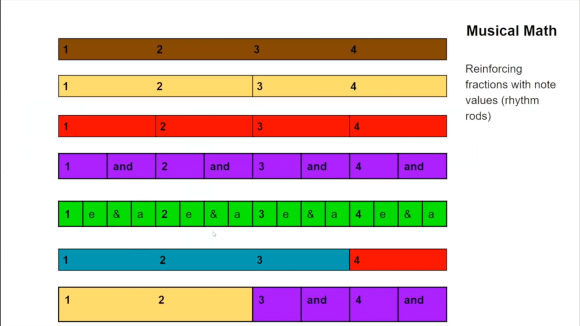
New Harmony Line’s Director of Education Cecilia Roudabush kicked off this month’s Second Saturdays workshop with a lesson on this concept – the rhythmic, fractional values that make up music. Understanding a single measure as a whole that can be divided up into several pieces can be easier for many when visualizing a measure as a bar or a pie cut into different sized pieces:

After a visual primer on how a whole measure can be made up of many different combinations of half, quarter, eighth, and sixteenth notes (among other values), we discussed how stress can be placed on different beats and off-beats in the measure to create different effects. For example, in 4/4 time (when there are 4 quarter-note beats per measure), many pop songs place more emphasis on beats 1 and 3 than 2 and 4, while oftentimes in jazz music more emphasis is placed on 2 and 4.

We jumped into Hyperscore to start composing with these concepts in mind. Translating Cece’s lessons into sound, we created melody windows with motifs breaking up the measure into different rhythmic values – one whole note, two half notes, four quarter notes, and eight eighth-notes:

Then, we started layering them against each other in the sketch window to hear the ways they relate to each other. We hear the articulation of a quarter note every two eighth notes, a half note every four eighth notes, for example. We ended up with an intro with each of these motives in sequence, creating a “countdown” effect, before layering them against each other and using changes in instrumentation to make the different length notes sound out clearly against each other.

The different colors in the Sketch window each represent one of the above melody windows.

We added more complexity to the piece by creating melody windows that include rests to emphasize certain beats (and off-beats). We also decided to add more interest to the composition by contrasting the single-pitch motives we were working with against a singsongy melody window with varying pitch. A percussion window demonstrated the frequent effect that rhythm sections have of underscoring stress on certain beats of the measure:

With these different elements we gradually wove together a densely textured, bright and bouncy tune. Listen to the full piece “Fraction Attraction” below – and check out the full recording of the workshop as well to see our composition process and watch how the piece came together! Join in on the fun by registering for our free composition workshops that take place every second Saturday of each month – we look forward to making music with you!

Cover image courtesy of solod_sha via pexels.com.

Categories
Listen News Read Watch

The Melt: Composing a song from an audio prompt

This month’s Second Saturdays Hyperscore composition workshop started with a sound:

Striking and familiar yet uncanny, this sound, which we encountered in this 2020 article from The Guardian, is that of Antarctic icebergs melting. The sound of rushing water is punctuated by an eerie and percussive whooshing and popping sound, which, as the article explains, is the sound of primordial air breaking out of millennia-old bubbles, held no longer by the ancient, now melting, ice.

We listened to this in the context of taking inspiration from clips of sound from the world for musical composition. How might we translate the feelings that came up, and the rhythms of the sound of the melt itself, into music? We set out to find one answer to this question during the workshop.

We began by naming the feelings and atmospheres that were evoked for each of us when we listened to the sound of the iceberg. Themes arose as we spoke of familiarity, awe, uneasiness, uncanniness, and surprise. What sounded like rushing water in the clip was a familiar, even comforting sound, but the interruption of the strange popping sound gave an edge to this feeling. The additional context that knowledge of climate change gave to the sound – the melt reaching farther into the ice, and getting louder, every year – added a somber, even grim, undercurrent. We wanted to approach composition both mirroring what we were literally hearing (a constant, smoother sound punctuated by sudden and unexpected pops) and the emotional reactions that this sound and its context created in us.

Moving into Hyperscore, we decided to start with some melody windows that could serve as an ambient, slow backdrop to the piece, using notes with long durations and in a low register, using a timpani and strings for our instrumentation.

We then created some strokes to correspond to these motifs in the Sketch window. The result was melodically tense and rather menacing.

We had our “consistent” sound which we then wanted to break up with unexpected interruptions and percussive splashes. To add a rhythmic yet unpredictable element we composed two faster-moving melodic motifs on pizzicato strings – one with a measure broken up into 3 notes of equal value (in other words, a half-note triplet), and one with a measure broken up into 4 notes of equal value (in other words, quarter notes).

When played together and layered into the Sketch window, they created a kind of rhythmic dissonance and a sense of driving momentum that broke above the surface of the steady and slow sounds we started with. We decided to emphasize this sudden and inconsistent effect to introduce these new sounds in the Sketch window (represented by the light and dark green strokes) as fragments that would pop in and out before returning in earnest and persisting for what would become the climactic moment of the composition:

To add even more emphasis to this climactic section and create a mood of mounting urgency, we created another 3-against-4 rhythmic figure on woodblock in two Percussion windows and added this in the Sketch window as well:

The intensity of the climactic section increased with the addition of the orange and purple percussion motives.

We liked it but found that we were deviating some from the unpredictable sense that we got from the popping in the initial iceberg sound clip. To reintroduce that surprise, we created a version of the green motifs that was a bit more sparse, while still maintaining the 3-against-4 feel, and applied this to the green strokes only in the latter half of our piece.

We decided to tweak the percussion windows as well, making the note attacks much more rapid and inconsistent and adding in some triangle hits:

We continued on with this process of listening to our composition, reacting to what we were hearing, then making changes and additions according to our reactions. Through this process in the course of the rest of the hour-long workshop, we added a mournful, soft ambient drone of low flute and organ, and a jerking, syncopated melody played on pizzicato strings.

We arranged all of the building blocks we had created into a form that ebbed and flowed between themes of rattling urgency and dirge-like somberness. Without planning to, we ended up creating a rather atonal and dissonant piece that nonetheless carried in its undercurrent a driving movement that enthralled us when we listened to the final product. We ended by titling it, appropriately, “The Melt”.

Listen to the final, 80-second-long composition below, along with a recording of the full workshop including our brainstorming, composing and editing process.

Iceberg image courtesy of Angie Corbett-Kuiper via Unsplash

Categories
News Read

Removing barriers to creativity with Hyperscore

Getting students invested and excited about music can be one of the most challenging aspects of teaching the subject, as many educators know all too well. Students may come to conclusions early that music just isn’t for them, that they’ll never understand, or decide that they don’t want to learn all the complicated lingo and notation just to be able to express themselves. Hyperscore was built with this in mind, designed to open up surprising new avenues for learners and slip between the gaps in the barriers that block students from being able to access their musical curiosity and wonder. In a recent EdSurge feature article, music educator extraordinaire and Hyperscore enthusiast David Casali shares his personal experience of how Hyperscore inspired his classroom to express their creative talents for music in previously unimagined ways.

Musical voices blossom

Casali came across Hyperscore at the height of the pandemic, at a time when remote classes made it even more difficult to connect with students. Facing disengagement from students and wanting to find ways to bring the most reticent voices in the classroom into the fold, Casali decided to experiment. Inspired by his students’ love of playing games, he had the idea to integrate Hyperscore into Scratch, the popular program used by millions of children to program computer games, and ask his students to compose music to add to Scratch games. The experiment was a resounding success, and Casali saw the barriers falling between students and their previously out-of-reach musical inspiration. One student who was had been convinced that she had no musical talent submitted an assignment using Hyperscore and Scratch that spoke to quite the contrary! Throughout the classroom, students showed off their creative voices for music – some for the first time in their lives.

Making music education work for students

This experiment in Hyperscore and Scratch was a crucial step for Casali in rethinking how a music classroom could be relevant and accessible to students, and how to remove artificial barriers to creativity. With these groundbreaking tools, students do not have to be restricted by pre-existing ability to play an instrument or decipher the nuances of traditional musical notation. When these barriers are lifted, students can express musically what is already in their hearts and minds. They can take a leading role in their musical education rather than only following rigid and inflexible curricula. When teachers are willing to listen to the needs of their students and hear what excites them, tools like Hyperscore are there to support them in uplifting and amplifying their students’ voices.

Categories
Read

Hyperscore through the years

Hyperscore is experiencing a renaissance in its lifetime through the recent release of the web-based Hyperscore 5. However, Hyperscore is by no means new on the scene. It has a storied history of sparking the musical imaginations of people around the world. The proven success of Hyperscore is indeed what gives us our drive at New Harmony Line to make the software available and accessible to all.

What’s the story?

Hyperscore has been making waves in the musical and educational worlds for over twenty years. From its imaginative beginnings in 2000 at the MIT Media Lab, Hyperscore has spanned the globe and inspired countless teachers, students and composers. Diverse groups of collaborators have used Hyperscore to compose 7 symphonies (and counting!) performed by prominent orchestras across the world. In equal measure though in many different ways, children, adults and elders have found expressive, therapeutic, and connective meaning through composing in Hyperscore. Today, New Harmony Line is reinvigorating the revolutionary power of Hyperscore by bringing it to new audiences and classrooms everywhere.

The years laid out

History matters – and keeping an accessible record of Hyperscore’s history of positively impacting lives matters deeply to us. To this end, we have published a History of Hyperscore timeline on our site which spans 2000 to present. Now anyone can take a dive into the archive and explore what has made Hyperscore compelling for over two decades. What’s more, this is a living record, and we will continue to update the page as exciting new developments for Hyperscore continue to take place. There is certainly much on the horizon, and we look to Hyperscore’s history of opening possibilities to inspire every step we take.

Categories
Read Resources

DIY Workshop

If you’re interested in trying out Hyperscore to teach music composition but are not ready or able to fully commit, this article is for you. This is for the retired educator who wants to help out his daughter who is homeschooling her kids. This is for the teacher who doesn’t have it in her budget this year but is eager to find a way to engage the kids in her classroom now. This is for the nonprofit foundation that wants to run a music camp next summer. This is for the after school club seeking an exciting project….

Step one. Decide if everyone will gather around a single computer or if everyone will have their own device.

Step two. Each device / individual should sign up for the Free Trial version of Hyperscore.

Step three. Decide on the type of composing activity you want to lead. Most can be done as collaborative or individual activities. Check out our blog for ideas.

Pro tip 1: The free trial version of Hyperscore cannot save more than five compositions in the cloud, so remind participants to download and save their compositions locally on their device.

Pro tip 2: Let the participants lead the way. Your role is to encourage exploration and discussion. There’s no right or wrong way. Be the guide on their side, not the sage on the stage.

If you are using Hyperscore successfully and wish to continue, we recommend a basic, premium, or supreme subscription. These are affordable options for small groups and will allow you to:

  • Create up to 5 user profiles
  • Save more scores (compositions)
  • Use more melody and sketch windows
  • Unlock different instrument sets
  • Unlock more themes
  • Export audio and MIDI output

If you would like to use Hyperscore in larger classrooms and manage your students’ work, we recommend that you license the classroom version through MusicFirst or by contacting us.

Categories
Read

Bach BOT

by June Kinoshita, Executive Director, New Harmony Line

Okay, I made up the title to riff on music AI, only to discover there really is a Bach Bot out there. It’s a system that uses AI to generate Bach-like music. I shouldn’t have been surprised. Music AI bots are proliferating alongside other generative AI programs. Major media and music companies are investing in AI-generated music, raising alarm among those who care about musical culture. 

In a recent article, the Washington Post reported, “AI music has found its way into the mainstream — you’ve probably heard a few seconds of it even today: soundtracking ads on YouTube and Facebook, or providing the emotional context of a TikTok video.” 

Some music AIs are designed to suck up all the music you listen to and generate more music that sounds similar but isn’t composed by an actual human. Think of all the royalty fees these companies won’t have to pay. Other companies are developing algorithms to generate tunes that will optimize your mental state.

But can such sounds, generated without any human intention, without a living person trying to communicate their experiences and emotions, be considered art? With art, it takes two to tango. You need an artist with an intention to provoke a response, and a recipient who brings their own sensibilities to bear on how they respond. Intention and framing matter. That’s why John Cage’s 4’33, the piece that famously asks you to listen intentionally to the world around you for four minutes and 33 seconds, is art while my silent procrastination is not. When I sit through a performance of 4’33, the composer is communicating with me, even if the man is no longer living. Without the artist mediating the experience, it’s just me projecting.

“Pieces of music aren’t just pieces of sound,” says Tod Machover, the composer and co-founder of New Harmony Line.. “They’re because some human being thought something was important to communicate and express.”

There is an appropriate place for AI in music, says Machover. In his own work, “I try to make models that are productive and useful and interesting and beautiful,” he says, “and I personally believe in a kind of collaboration between people and technology.”

This belief helps us appreciate Machover’s intention behind the creation of Hyperscore. Here is a tool that utilizes technology to remove barriers to music composition. That doesn’t mean it automates the process of composition. Hyperscore takes away the parts that untrained musicians find hard and leaves the kernel that is most important: What is it you need to say? 

In a world where we are losing more and more of the human touch, where nearly everything we use in daily life, from our clothes, work tools, and food, is manufactured by machines, we crave ways to express and celebrate our human moments. Witness the explosion of interest in preparing food, knitting, DIY projects.

People are hungry for channels to express themselves creatively. Music is among the most direct, powerful ways to tell our stories. We must elevate and celebrate authentic, human music by supporting artists, music education, and the means for everyone to participate.

Coda

Just after posting this, I was struck by the irony that I had used an image (below) that I had generated using DALL-E (“Baroque-style etching of J.S. Bach as a robot”). It was fun, but I agonized over whether I was unknowingly stealing bits actual artists’ work or undermining the market in which they made their living. Is there a place for AI-generated illustrations? What do you think?

Categories
Read Resources

Best music software for classrooms

The marketplace is awash with software for music, from toy-like games to complicated digital audio workstations (DAWs) for professionals. How’s a teacher to choose? Music educator Cecilia Roudabush, a 30-year veteran of the Iowa City schools and director of education for New Harmony Line, is always on the lookout for tools that produce satisfying results in real classrooms. She reviews some popular and favorite applications.

Chrome Music Lab
“Chrome Music Lab is a website that makes learning music more accessible through fun, hands-on experiments.”
User age: All ages
Best features
No account needed; click on any experiment for immediate use
– 14 experiments to choose from
– Shared Piano, Songmaker, Rhythm and Kandinsky all feature music making as their core purpose
– Shared Piano and Songmaker can be posted or shared
– Shared Piano can involve live collaboration with another user
– 6 of the experiments feature the ability to use your voice as part of the music making or conceptual process
– Quick connections to science, art, coding and math as well as musical concepts
– Every experiment has a question icon that loads a text description of how to use the experiment or what concept it is demonstrating
– All the tools are visual icons that most people will have used, seen as a computer user or can understand from experience (walking figure versus running figure for tempo)
– Works on any device that can load Chrome
Ease of use:
– Composing feature in Songmaker and Melody Maker is intuitive with experimentation
– Most students will explore the tools and use the ones that work easily for them
– Kaninsky requires a touch screen which is not evident
– May hold the attention of younger users for a longer time than older users; Rhythm is very fun but doesn’t expand beyond the 4 choices and is not something you can save or share
Teacher review:
There are many wonderful features to this online technology for elementary students.  Experiments like Arpeggio, Harmonics, Piano Roll, Oscillators and Strings are useful for presenting a facet of a concept. Melody Maker and Songmaker would be excellent introductory composition tools.  Shared Piano would be interesting for creating melodies that someone else could play back, but the synesthesia method used is backward from the usual “drop from the top and touch the key you need to play”. If elementary students haven’t used synesthesia videos from YouTube to learn songs on the electronic keyboard, that might not be an issue.

As 7th and 8th graders, my students were given the option of using Chrome Music Lab but most students chose not to use it as they had used it while in elementary school. The best usage of this in a one-trimester or -semester music technology class in secondary school is as a choice for free-time music making.
Pricing: Free
Icon: the Hyperscore "H" in blue, red, and green on black Hyperscore
A new way to compose music
“Lay down some notes, listen, react and evolve.  Hyperscore is an innovative web application with an intuitive graphic interface that puts creativity first and encourages active listening and purposeful composing.” 
User age: All ages. Under 13 need parent or school permission to create account.
Best features:
– Easy free account set-up. For Hyperscore Classroom, instructor sends email invitation for students to join classroom.
– Intuitive composing workspace: drop notes into the extendable rhythm and melody windows, listen, edit and continue to create melodic and rhythmic motifs;  motifs can be arranged in the harmony sketch window alone, or in combination with, other motifs
– Music is composed visually, allowing the user to manipulate note values, place pitch and arrange motifs with their eyes as well as their ears
– 1-minute video tutorials accessible to all users
– Teaching modules for elementary to secondary included in Resources for Educators
– User can customize note shapes, instrument sets, visually themed workspaces, and rainbow-themed diatonic scale
– Unique harmonizing tool in the sketch window: “general” and “classical” will adjust notes to fit harmonic principles.
– Unique Harmony Line function allows the user to add tension, release or drama to their composition
– Cloud version saves work automatically; projects can shared and remixed, and moved to a personal account once the class is complete 
Ease of use:
– Creative composing feature is very intuitive. Most students of any age or ability will be able to use the program
– Students will explore and use the tools with little support needed once they learn the basic composing process (write, listen, edit)
– Students will quickly learn their preference for monophonic or polyphonic melodies with some instruction needed for stacking musically rather than just filling the space
– Intentional composing can be achieved with storytelling or prepared composition prompts
– Scaffolded curriculum would allow students to collect their work year-to-year in a portfolio showing increasing sophistication in their compositional style
– Contact district technology department prior to creating accounts to make sure emailed account codes arrive directly in student in-boxes
– New Harmony Line’s Privacy Policy contains a prepared Parent/Guardian consent form for family/student users under the age of 13
Teacher review:
As 7th and 8th graders, my students used the original Hyperscore as a composing and arranging tool. The majority of students could compose independently with the program because of its intuitive tools. Seeing music written visually was considered to be a strength of the program.  Students were able to edit and arrange motifs, and to judge what they liked and did not like about their choices.  Students also used the dynamic, tempo, harmonic tools, tone color and copy/paste features once they were presented as options they could choose to utilize.

The upgrade to the web-based version in 2021 has allowed students from ages 3 to 18 to compose original works of music with simple instruction on using the tools.  By inverting the pedagogy and allowing students to compose before structuring the theoretical understanding of their process, students showed amazing leaps of creativity in their rhythm pattern choices, melodic shapes, use of non-traditional time signatures and harmonic combinations. Asking students to name their piece often elicited a peek into the imagery within their work.  Giving a student a storytelling or prepared compositional prompt also yields amazingly creative work.

Composing, editing and arranging are its best usage in a one-trimester or -semester music technology class. Musically motivated students would find a trimester elective in composing with Hyperscore invaluable, which may lead to some career pursuits or lifelong interaction with music. Elementary general music teachers would benefit from using the program as a K-6 portfolio of mastery of compositional techniques.
Pricing:
– Free Starter Plan (5 projects)
– Basic $3.99/month (5 seats and 10 projects)
– Premium $9.99/month (5 seats and 20 projects); $8.00/month with annual plan discount
– Supreme $14.99/month (unlimited); $12.00/month with annual plan discount
– MusicFirst educator license. 30-day free trial. $199/year unlimited seating for 1 year; 3-year subscription $189.05/year unlimited seating
– Hyperscore Classroom license. $199/year plus $2 per seat.
Incredibox
A fun, interactive music experience
“Create your own music with the help of a merry crew of beatboxers. Choose your musical style among 8 impressive atmospheres and start to lay down, record and share your mix.”
User age: Any age, as this program does not require account creation.  Parental Control button available in settings.
Best features:
– Immediate use with no account required (more content with downloadable app but not necessary to enjoy the experience)
– Very intuitive program; visual and textual help screens pop up once you choose your first mix set
– Available in 6 languages
– Drag and drop pre-recorded loops onto each beatboxing character which provides them with a themed “outfit” and a sound associated with their character
– You can record and save your mix (appears to be a cloud save because you do not enter any personal information although you can give yourself a handle for your mixes
– Name and share links immediately; the Playlist button allows you to see what’s been recorded in the last 24 hours as well as a Top 50 playlist of popular mixes
Ease of use:
– Arranging and mixing feature is very intuitive with visual/text guides if needed
– Most users will find this very fun and motivating
– You can spend hours listening to all of the mixes others created–inspiration to be found from the simple to sophisticated mixes
Teacher review:
As 7th and 8th graders, my students used Incredibox completely independently as a mixing and arranging tool. Most students used it purely for fun–they didn’t even realize they were making musical choices as they “played”!  Some used their mix as their final product for the composition unit and turned it in for a grade since their final product requirement was to spend 3 class periods ‘making music using technology’.  Although peers found it very entertaining, I made sure to label it as “mixing and arranging” rather than “composing”. 
 
Incredibox could be a wonderful introductory program into other mixing, arranging and editing programs or as a way to introduce composition during a one-trimester or-semester music technology class.  A few students will enjoy this for one class period and then be ready for something more sophisticated and not return to it again, whereas others will continue using at home or on their phone and share the website URL with others.  Most elementary students would find it just completely fun, although I did have a student or two who expressed concern that the beatboxers were bare-chested until you “dressed” them.  As a teacher myself, I find it to be a fun distraction that I return to a few times a year.
Pricing:
– Alpha version on website is free
– Educational Version 12 seat minimum for $12/mth
– App available on App Store, Steam, Microsoft Store for $4.99
– Merchandise store with coffee mugs to art ranging in price from $14.99 to $147.99
Soundation  
Make music in an online DAW
“An online studio where you can make beats, record & edit audio/MIDI, mix, and collaborate. 20000+ loops and samples. 15 audio effects.” 
User age: 13+ (use granted for those under 13 with Parent/Guardian permission)
Best features:
– Easy account set-up (Google login) for immediate use
– Video tutorials and user step-by-step guides
– Drag and drop pre-recorded professional loops from the Sound Library
– Choose audio effects for each loop
– Share links, collaborate or place your work in the Community forum
Ease of use:
– Composing feature is not intuitive
– Motivated students will explore the tools and use the ones that work easily for them
– Features a QWERTY virtual keyboard but does not have a step-by-step guide for using it
– The right toolbar has icons that are useful but not defined–most students will need to be taught their purpose and how to use the export feature
Teacher review:
As 7th and 8th graders, my students used Soundation independently as an editing and arranging tool.  No student chose to compose with it because they were too impatient to watch the videos and it was not intuitive for composing.  Students were able to independently understand editing and arranging sound loops and to judge what they liked and did not like about their choices.  Many students used the channel features but only at the surface level.  I had to teach students how to export their files to me for their final grade.

Editing, mixing and arranging are its best usage in a one-trimester or -semester music technology class.  Elementary students would be able to use the program with mixing and arranging lessons and guided practice.
Pricing:
– Free (3 projects and 1 GB storage)
– Starter (10 projects) $9.99/month; annual plan $4.99/month
– Creator (unlimited projects) $14.99/month; annual plan $9.99/month
– Pro (unlimited projects) $49.99/month; annual plan $29.99/month
Soundtrap  
Make music together. Online. Your everywhere studio.
The best collaboration platform for making music online.”
User age: 13+ (use granted for those under 13 with Educator School Account)
Best features:
Easy account set-up (Google login) for immediate use for 13+ users
Video tutorials for all features
Light and dark mode for personalization of workspace
Drag and drop pre-recorded professional loops from the Sound Library
Choose sophisticated audio effects for each loop with tutorials for using effects
Record,edit and collaborate on any device and store your work in the Cloud
Auto-tune feature offers the ability to pitch and modify voice recordings
Audio editing tools (volume, pan, filter sweep effects)
QWERTY synthesizer that allows you to easily play a virtual keyboard using the keys on your computer keyboard (dozens of sound settings available with effects settings) or a piano roll that allows you to click from low to high and extend the value with your mouse monophonically or with polyphony
Connects your microphone, guitar or any other electronic instrument to the program
Patterns Beatmaker tool allows you to make your own beats with 18 percussion instruments associated with a traditional trap set
Record, transcribe to text and edit your own Podcast which can be uploaded to Spotify or downloaded as a link for you to post anywhere
Educator Account links to all major LMS platforms and provides many of the features present in a personal use account with additional lesson plans and assignments
Ease of use:
Composing feature is sophisticated and would take multiple lessons for a student to learn the tools
Motivated students will explore the tools and videos and make incredible music; students who are taking a required course will need lessons and step-by-step assignments to use the technology and may find the vast resources overwhelming without finite boundaries
Beatmaker tool seems to only be quarter note values–there’s probably a video tutorial for that!
Easy to share, post, collaborate
Teacher review:
As 7th and 8th graders, my students used Soundtrap independently as an editing and arranging tool.  The composing tool has improved dramatically since we last used it.  Most students were able to independently understand editing and arranging sound loops and to judge what they liked and did not like about their choices.  A small number of students used the array of features, but the majority of students used it only at the surface level.  

Editing and arranging loops are its best usage in a one-trimester or -semester music technology class. An entire trimester or semester music elective would be needed to allow focus on the usage of all of the features of this online music technology tool which may lead to some career pursuits or lifelong interaction with music..  The podcast feature could be used by Language Arts, Drama, Musical Theatre and Music Production electives as well as in a Music Technology class through which a student could share their work, the work of others, reviews of current music or insights into the music they love. Elementary students would be able to use the program with mixing and arranging lessons and guided practice.
Pricing:
– Free plan
– Music Makers Premium $9.99/month; annual plan $7.99/month
– Music Makers Supreme $14.99/month; annual plan $11.99/month
– Storytellers (podcasts) $14.99/month; annual plan $11.99/month
– Complete $17.99/month; annual plan $13.99/mth
Education Version–30 day Free Trial (up to 500 seats with all features); School or District Plan $349 plus applicable taxes for 50 minimum seats ($6.98/seat); price per seat lowers as you add additional seats
Categories
Listen Read Watch

Creating a Character through Music

Think of one of your favorite characters from any form of media. Chances are, they evoke some emotional response in you that has drawn you toward them. Characters can be abundant sources of joy and inspiration for all of us, as can be seen from just a glance online at the copious amounts of fan art and works created by all sorts of people motivated by their passion for all sorts of characters.

We used a character as the foundation for making music with Hyperscore at our most recent Second Saturdays Zoom workshop. We began by coming up with a character: one attendee brought up her affection for capybaras, and we soon landed on Cappy the capybara as the protagonist for our musical story.

We brainstormed a list of association words and phrases that we imagined Cappy to have, to inspire the composition of his leitmotif – a musical theme associated with him that would repeat throughout our piece. “Sleepy”, “determined”, “furry”, “plump”, “aquatic”, and “adorable” were among these descriptors. Thinking of these words, we started laying down some notes in a Hyperscore melody window that would encapsulate Cappy’s energy, using the warm sound of a french horn.

An orange Melody Window plays two variations on a five-note figure using a French Horn.
Cappy the capybara’s theme

The next question was, what’s the story? Cappy needs an exciting adventure. Imagining various scenarios prompted a second character–a hungry alligator!

A green Melody Window represents the alligator, with string notes in the lower register that rise up to peak above the water.
The alligator’s theme

There should be more than danger motivating our story. What is something that would make Cappy happy? Why, some delicious fruit, of course.

The light green Melody Window with six flute notes in two bars
The fruit theme represents Cappy’s snack

And where does all this action take place? Alligators inhabit rivers, so we needed music to suggest rippling water.

A blue polyphonic Melody Window with eight notes in two bars creates a rippling water motif.
The water theme accompanies Cappy when he goes for a swim

Now that we had our main characters and setting, what about the action? Cappy goes out for a stroll and come to a river. He starts swimming but Alligator enters the scene. When Cappy realizes he is being stalked, he starts swimming faster. There’s a race culminating in Alligator lunging at Cappy!

A yellow to-bar Percussion Window has half notes alternating between high and low toms with a wood block on the off beat that ends with a "crunch" of triangle and tambourine.
A two-bar percussion figure depicts Cappy walking and racing, as well as munching on fruit

Here’s “Cappy’s Day.” Listen to hear the different themes and find out Cappy’s fate!

Hear the motifs that represent the characters and story elements, as well as the final composition.

Here is the full Second Saturday workshop showing in real time how we put this composition together. Peter shares a ton of subtle Hyperscore tricks and hacks!

Want to try this out yourself? Sign up for our free Second Saturdays workshops here.